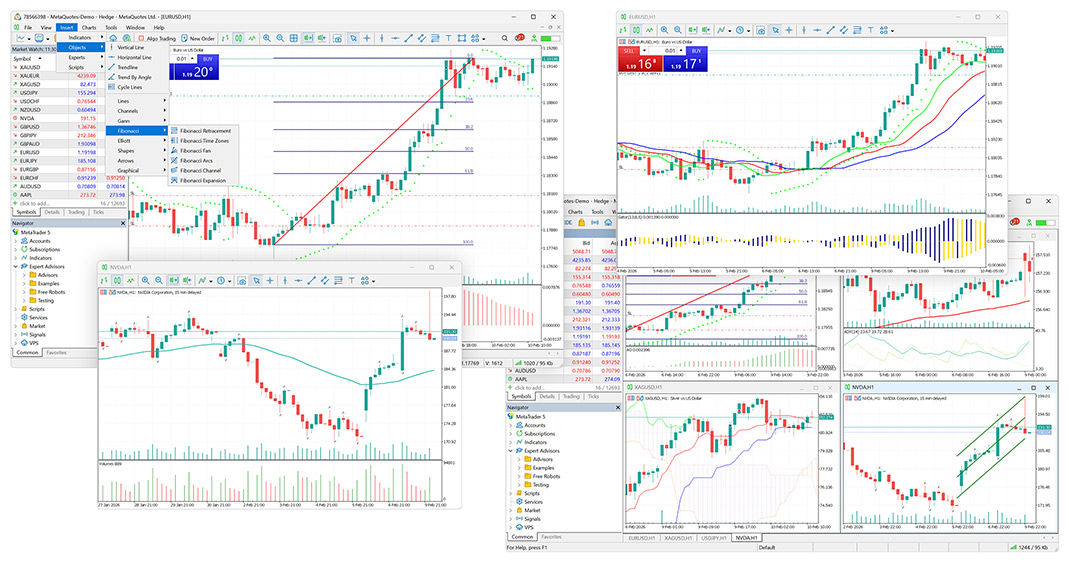
Charting tools
Use configurable charts, indicators and drawing tools to organise your analysis.

FP Markets cTrader broker review
FP Markets offers Standard and Raw cTrader accounts. Compare their pricing, explore the platform and check which company would hold your account before registering.
Regional restrictions: FP Markets does not support customers from Afghanistan, Cuba, Canada, Iraq, the Islamic Republic of Iran, Liberia, Libya, Myanmar, Palestine, the Russian Federation, Somalia, the Syrian Arab Republic, Sudan, Yemen, the United States, the European Economic Area (EEA), or jurisdictions subject to FATF, EU or UN sanctions.
Our overview
The main account choice is how the broker charges for a trade. Standard forex pricing includes the commission in the spread; Raw forex pricing separates the spread and commission. Neither account is automatically cheaper for every trade.
Compare the same instrument, trade size and holding period. A tighter spread may be offset by commission, while overnight financing can matter more for positions held over several days. Check the schedule offered to you rather than treating a group-wide headline as your account terms.
The platform
The broker describes charting, order management and automation in one platform.
Use configurable charts, indicators and drawing tools to organise your analysis.
Level II pricing provides another view of available market liquidity.
Market, limit, stop and stop-limit orders support different entry approaches.
Use custom indicators and cBots; test compatibility before deploying your software.
Desktop, web and mobile versions let you access the platform on supported devices.
Copy-trading integration is advertised. Check availability, provider fees and risk controls before subscribing.
Before opening an account
Check the account provider, total costs and platform before you commit.
Read the company name in the account agreement and check it against the regulator’s register.
Add the spread, commission, financing and any conversion or payment charges for your intended trades.
Inspect the symbol list, order sizes and platform controls. Test any indicators or cBots you intend to use.
Understand verification, funding, withdrawal and support procedures before deciding whether to proceed.
Accounts and costs
The international cTrader fee table lists Raw forex and metals commission at USD 3 per lot each way, converted to the base currency. Opening and closing one lot therefore costs USD 6 in commission before spread and financing. Standard pricing includes commission in the spread for these categories.
Commodities, indices and cryptocurrencies are listed as spread-based on both account types. Equity and ETF CFDs have separate market-based charges and minimums per side. Do not apply the forex rate to every instrument.
Use the official cTrader fee schedule and your account documents to confirm the relevant regional terms.
Regulation and protection
The brand operates through different companies. A licence held by one company does not automatically protect an account held by another.
Markets and eligibility
The advertised cTrader range spans forex and CFDs on several asset classes. Your actual symbol list depends on the platform, account and regional offering. A broker’s total instrument count should not be treated as the number available in your own account.
Open each intended symbol’s contract specification. Compare contract size, minimum volume, trading hours, margin and financing. For share CFDs, check corporate-action treatment; for products with an expiry, understand when and how the contract rolls or closes.
Strengths and considerations
Frequently asked questions
Yes. Its platform pages list cTrader, with Standard and Raw account options. Confirm availability with the company holding your account.
The international schedule lists USD 3 per lot per side for forex and metals. Other markets and regional schedules may differ.
No. A commission included in the spread is still a trading cost. Financing and other applicable charges can also affect the total.
The platform supports C# automation and custom indicators. Test your software, data requirements and permissions on a demo first.
It depends on the company named in your agreement. Match that exact company to the relevant regulator rather than relying on the group’s list of licences.
It helps you learn the controls and test a workflow with virtual funds. It does not prove live spreads, execution, withdrawals or future returns.
Use the client portal’s demo route to check cTrader, compare account settings and test your tools before trading live.
Read recent positive and negative feedback on Trustpilot, especially about withdrawals, support and account administration. Check the service and company mentioned; reviews may cover platforms other than cTrader.
Sources cover the platform, fees and international account terms. The international fee page resolved to the Seychelles version; other companies may use different terms. We did not test accounts, execution, withdrawals or support. Demo guidance is not a test result.
Broker information can change. Verify the contracting company and licence on the regulator’s register before registering. Read our comparison method.
Compare the same markets and trade sizes with the companies serving your region before drawing conclusions about costs.