cTrader Desktop
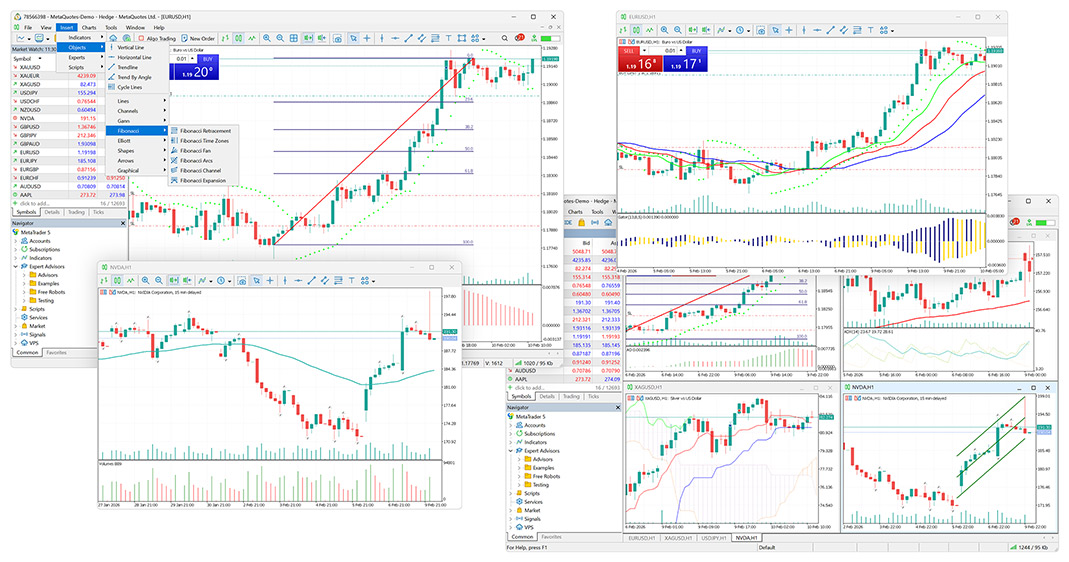
Use advanced charting, market-depth views, order protection, custom indicators and algorithmic cBots in the full desktop environment.

FxPro cTrader broker review
FxPro is a long-established multi-platform CFD broker offering cTrader across desktop, web and mobile. This review examines the cTrader account, published commission structure, platform features and checks on the company that will hold your account.
Trade Responsibly. CFDs are complex instruments and come with a high risk of losing money rapidly due to leverage. You should consider whether you understand how CFDs work and whether you can afford to take the high risk of losing your money.
Our overview
FxPro was established in 1999 and offers several trading platforms, including cTrader. Its cTrader service combines charting, market depth, manual execution and C# algorithmic tools, with connected access across supported desktop, browser and mobile applications.
FxPro publishes a cTrader commission of USD 35 per USD 1 million traded for FX and metals. For a 100,000-unit EUR/USD trade, its official example equates this to EUR 3.50 per side, or EUR 7 for opening and closing. Indices and energies are described as using marked-up spreads with no separate commission. Always confirm the charges for your account provider and the market you trade.
The platform
The strongest reason to compare FxPro is its broad cTrader implementation across devices and trading workflows.
Use advanced charting, market-depth views, order protection, custom indicators and algorithmic cBots in the full desktop environment.
Access charts and trading through a compatible browser without a local installation. Algorithmic development remains a desktop-focused workflow.
FxPro advertises cTrader access for iOS and Android, allowing account monitoring, chart analysis and order management away from a desktop.
Create or install custom indicators and cBots, then backtest documented strategies before considering any live deployment.
cTrader's depth-of-market tools display available pricing and liquidity information to support more informed order entry.
cTID links compatible cTrader accounts and can synchronise selected watchlists, settings and workspaces across devices.
Before opening an account
Check the account provider, total costs and platform before you commit.
Confirm which FxPro company would hold the account and verify its licence on the appropriate regulator's public register.
Add live spreads, round-turn commission, overnight financing, currency conversion and any payment-related charges.
Use a demo to inspect symbols, chart data, order sizes and the compatibility of required indicators or cBots.
If you proceed, use modest funding and test support, deposits and withdrawals before increasing account exposure.
Trading costs
FxPro's published cTrader commission applies to FX and metals and is calculated from trading volume. Commission is only one component of cost: the bid–ask spread is paid as well, and positions held beyond the trading day may incur financing.
FxPro states that indices and energies on cTrader use a marked-up spread with zero separate commission. Pricing models can change, so use the current contract specification and commission calculator for your account provider and account currency.
Regulation and protection
FxPro operates through multiple regulated companies. The products, leverage limits and compensation arrangements available to you depend on residence and the company named in your account documents.
Markets
FxPro advertises CFDs across forex, metals, indices, energies, futures, shares and other categories, but availability can differ by platform, account provider and country. A product shown on the wider FxPro website may not appear in your cTrader account.
Use a demo symbol list and read the contract specification for each intended market. Check session hours, minimum volume, margin, commission, swap and whether corporate actions or expiry rules apply.
Who may consider it?
Frequently asked questions
Yes. FxPro's official platform page lists cTrader for desktop, web, iOS and Android. Features differ by environment, and you should confirm availability with the company holding your account.
FxPro currently publishes USD 35 per USD 1 million traded for FX and metals. Its EUR/USD example is EUR 3.50 per side for 100,000 units. Confirm the current calculation for your account currency.
Yes. FxPro's cTrader desktop offering supports custom cBots and indicators. Compile and test third-party or custom software on a demo account before live use.
FxPro operates through several regulated companies, including FxPro UK Limited under the FCA and FxPro Global Markets Limited under the SCB. Verify the exact company offered to you.
No. FSCS eligibility relates to FxPro UK Limited and depends on customer status and the nature of a claim. It should not be presented as universal group-wide coverage.
A demo account and educational information can help a beginner learn the platform, but leveraged CFDs remain complex and high risk. Understand margin, orders and costs before funding a live account.
Explore the platform, compare its pricing and check which company would hold your account and what protections apply.
Trade Responsibly. CFDs are complex instruments and come with a high risk of losing money rapidly due to leverage. You should consider whether you understand how CFDs work and whether you can afford to take the high risk of losing your money.
Read recent positive and negative feedback on Trustpilot, especially about withdrawals, support and account administration. Check the service and company mentioned; reviews may cover platforms other than cTrader.
This review uses broker-published documents. We did not test accounts, execution, withdrawals or support. Demo guidance is not a test result.
Broker information can change. Verify the contracting company and licence on the regulator’s register before registering. Read our comparison method.
Compare the same markets and trade sizes with the companies serving your region before drawing conclusions about costs.