Define the invalidation point
Place the stop at the price where the original trade idea is no longer valid, rather than choosing an arbitrary cash loss.

Free cTrader charting utility
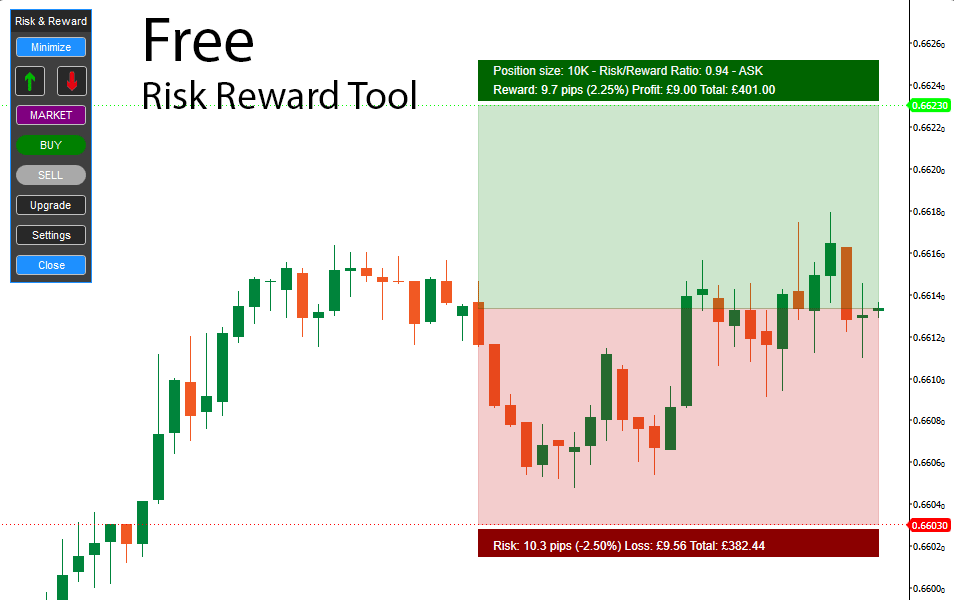
Plan a trade visually before placing it. The ClickAlgo Risk & Reward Tool helps you mark the intended entry, stop-loss and profit target directly on a cTrader chart so you can assess the trade structure and potential risk-to-reward ratio.
Why use it?
A trade idea is incomplete until you know where it becomes invalid and where you intend to take profit. The free cTrader Risk & Reward Tool puts these levels on the chart, making the distance to the stop and target easier to compare.
This visual planning step can help expose trades where the potential reward is small relative to the amount at risk. It also encourages you to decide the exit structure before market movement and emotion influence the decision.
Core benefits
Use the charting tool as part of a written trading process, not as a signal to buy or sell.
Place the stop at the price where the original trade idea is no longer valid, rather than choosing an arbitrary cash loss.
Mark the intended profit objective and assess whether market structure supports the distance required to reach it.
Review the stop distance against the target distance before deciding whether the opportunity meets your trading rules.
Lay out either direction consistently, with the risk area and reward area clearly separated on the chart.
Predefined levels provide a reference point when price begins moving and make last-minute rule changes easier to recognise.
Use screenshots of the planned layout alongside a trading journal to compare the original idea with the final outcome.
How to use the tool
The sequence matters: define the trade logic and risk first, then decide whether the opportunity is acceptable.
Choose the price at which your setup becomes actionable, accounting for the order type and possible execution difference.
Set the invalidation level using the strategy and market structure, then note the distance from the planned entry.
Choose a profit objective supported by your method, nearby support or resistance and realistic price movement.
Compare risk with reward, calculate an appropriate position size separately and reject the trade if it breaks your rules.
Understanding the ratio
The ratio compares the planned loss if the stop is reached with the planned gain if the target is reached. If a setup risks 50 pips to pursue a 100-pip target, the planned risk-to-reward ratio is 1:2.
A larger potential reward does not automatically make a trade better. Probability, spread, commission, slippage, volatility and the quality of the setup all matter. A strategy with a high advertised ratio can still lose money if its targets are unrealistic or its winning trades are too infrequent.
Why we recommend it
The tool is simple, focused and practical: it improves the visibility of a planned trade without pretending to predict the market.
Frequently asked questions
Yes. The tool is available as a free download from ClickAlgo. Check the product page for the current platform requirements, licence information and installation instructions.
It is presented as a charting and planning utility. Review the current product documentation before use and never assume a visual level has created, protected or closed a live position.
There is no universal ratio that makes a trade good. The appropriate threshold depends on the strategy's tested win rate, market, costs and trade-management rules.
Use a dedicated position-size calculation process unless the current product documentation explicitly confirms that feature. The planned stop distance must be combined with account size and acceptable cash risk to determine volume.
No. It can make planned risk and reward clearer, but price can gap, slip or move beyond an intended stop. Trading leveraged products can result in substantial losses.
Download the free ClickAlgo Risk & Reward Tool and use it to map entry, stop-loss and profit-target levels before placing a trade.