Start without a blank code editor
Explain entries, exits, position sizing and safeguards in everyday language. Trader View guides the build; Coder View lets developers inspect and edit the C# source.

AI coding agent for cTrader
Turn your trading rules into a cTrader cBot, custom indicator or dashboard using plain English. Xen AI helps you check requirements, generate code, repair build errors and refine your project from backtest results.
Why use Xen AI?
Start with the rules you want to test. Xen brings specification, coding and build checks into one cTrader workflow, so you can make focused changes as your project develops.
Explain entries, exits, position sizing and safeguards in everyday language. Trader View guides the build; Coder View lets developers inspect and edit the C# source.
Review requirements for missing rules or contradictions. Defining how a strategy should behave makes the finished cBot easier to check.
Compile cBots and indicators from Xen, inspect build output and ask AI to repair errors. Download compiled .algo files for use in cTrader.
Upload a cTrader backtest report to explore weaknesses and possible next steps. Run backtesting and optimisation in cTrader, then use Xen to help interpret the results.
Use a screenshot of a panel or dashboard to explain the interface you want. Refine its controls and behaviour in stages rather than describing every visual detail from scratch.
Bring an existing cBot or indicator into the workflow to understand its logic, investigate an error or request a specific change.
What is Xen?
General AI assistants can write code, but they may lack the workflow and platform context needed for a practical trading project. ClickAlgo Xen is designed specifically to help create, understand and improve software for modern trading platforms, with a dedicated workflow for cTrader.
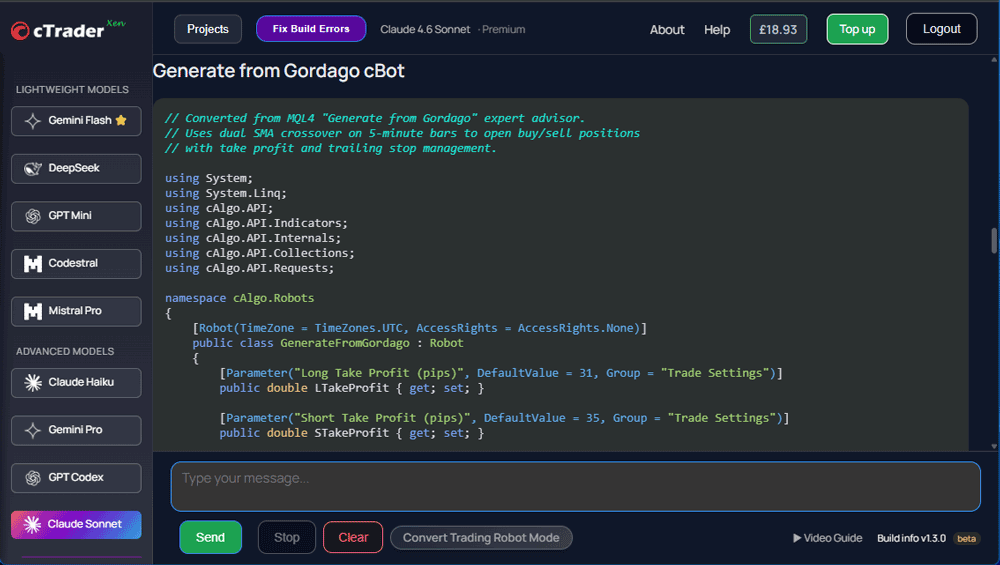
You can explain an indicator, automated strategy or utility in everyday language. Xen translates those instructions into code, helps you work through revisions and can explain how individual parts operate. This makes it useful to experienced developers who want to prototype faster and to traders who are learning how algorithmic systems are structured.
What you can create
Xen can help structure a wide range of cTrader projects when the requirements are specific, testable and broken into clear steps.
Create chart studies, signal logic, multi-timeframe calculations, visual markers and configurable alerts.
Prototype entry, exit, position-sizing and trade-management rules as an automated cTrader strategy.
Build interfaces that organise execution controls, account information, risk data and strategy statistics.
Develop position-size calculators, exposure controls and account-protection tools around documented rules.
Ask Xen to investigate build errors, explain likely causes and propose focused changes to existing code.
Use clearly documented logic as a starting point for recreating compatible tools from another platform.
A better AI workflow
The quality of generated code depends heavily on the quality of the instructions. A disciplined workflow produces clearer output and makes errors easier to identify.
Start with the platform, tool type and exact purpose instead of asking for an entire complex system at once.
Provide calculations, inputs, chart behaviour, trade conditions and examples with no important decisions omitted.
Review the code, compile it in the appropriate cTrader environment and report errors precisely.
Test each agreed behaviour, request focused changes and repeat until the prototype matches the specification.
Example instruction
A useful prompt describes the indicator or cBot, its parameters, calculation rules, visual output and alert behaviour. Adding acceptance tests gives the AI a clearer target.
Use AI responsibly
Xen can accelerate development, but it cannot prove that a strategy is safe, robust or profitable.
Frequently asked questions
You can begin by describing a tool in plain language, so advanced coding experience is not required. Basic knowledge of cTrader, trading logic and testing will still help you assess whether the output behaves correctly.
Yes. You can use existing code as context and request explanations, debugging help or focused improvements. Keep a backup and test every modification independently.
No. Xen assists with software creation and code analysis. It cannot predict future markets or guarantee performance, and generated tools should be researched and tested carefully.
Break the system into smaller components or use ClickAlgo's custom cTrader coding service for professional scoping and development.
Describe a focused idea, generate the first version and refine it through a guided AI development workflow.